

Open Deposit
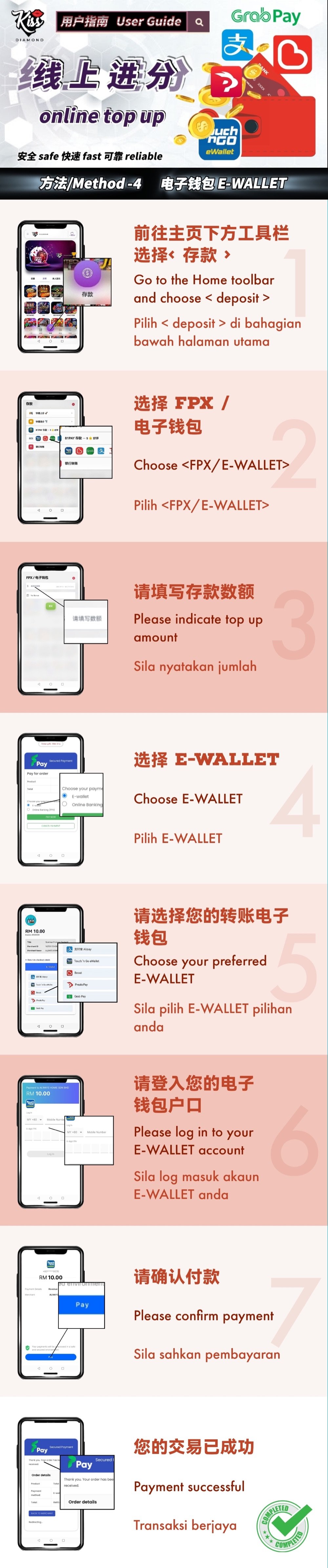
Select Deposit from the member-platform toolbar.
E-Wallet Illustrated Tutorial
KissDiamond — Use this guide when the member Deposit menu offers an E-Wallet route. The supplied artwork shows wallet selection, sign-in and confirmation; the brands available to your account may change.
Confirm the account name, amount and destination inside the official member platform. Never transfer funds using instructions received from an unverified contact.
Step Summary
Select Deposit from the member-platform toolbar.
Open the combined route shown in the supplied guide.
Type the amount and review the account currency and current limits.
Choose E-Wallet rather than online banking on the payment screen.
Select one of the wallet brands currently shown for the transaction.
Enter your wallet details only in the wallet's genuine sign-in or approval screen.
Check the amount and payment information before approving the transaction.
Wait for the success or status screen and retain the payment reference.
E-Wallet
Common Errors
Use only a brand displayed in the current payment screen for your account and currency.
Check the total in the wallet before tapping Pay or Confirm.
If the wallet is charged but the member status is pending, contact support with the reference before paying again.
KissDiamond
Open the member platform, select the method currently available to your account and compare each screen with the guide. Stop and contact support if the recipient, amount or status does not match.