

Open Deposit
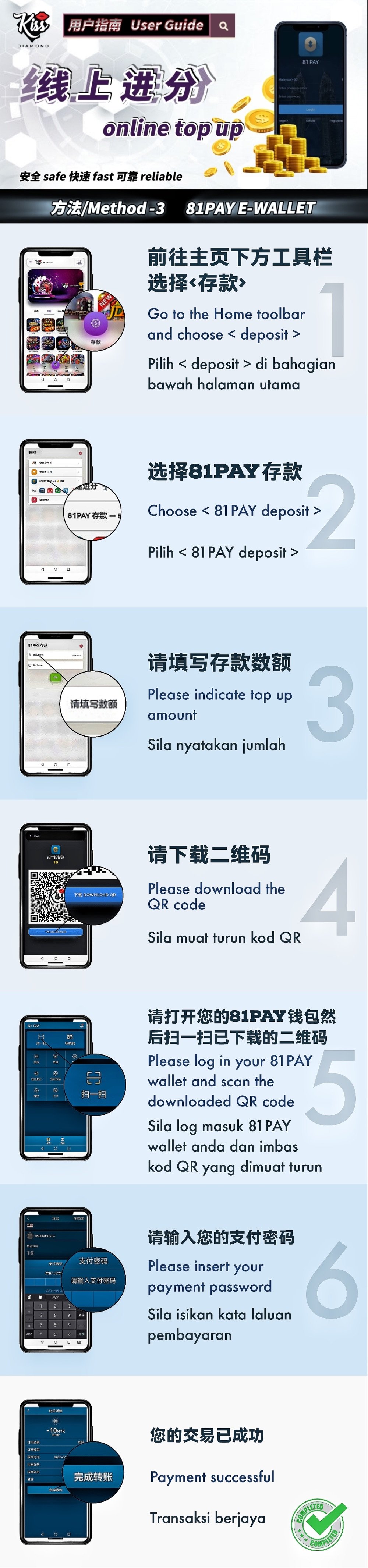
Select Deposit in the member-platform toolbar.
81Pay Illustrated Tutorial
KissDiamond — This guide follows the supplied 81Pay flow from the member Deposit menu to QR-code payment in the wallet. Confirm that 81Pay is currently available for your account before starting.
Confirm the account name, amount and destination inside the official member platform. Never transfer funds using instructions received from an unverified contact.
Step Summary
Select Deposit in the member-platform toolbar.
Open the 81Pay deposit method shown in the current list.
Type the intended amount and review the displayed currency and limits.
Download or save the one-time QR code produced for the transaction.
Open your own 81Pay wallet and scan the saved code using its payment function.
Check the amount and enter your payment password only inside your own 81Pay app.
Keep the payment reference and confirm the member balance or transaction record before repeating the deposit.
81Pay E-Wallet
Common Errors
Generate a fresh code from the current deposit session because payment codes may expire or be transaction-specific.
Confirm the wallet displays the intended amount and recipient context before approval.
Enter the password only in your wallet app and never disclose it to Customer Support or a third party.
KissDiamond
Open the member platform, select the method currently available to your account and compare each screen with the guide. Stop and contact support if the recipient, amount or status does not match.