

Open Deposit
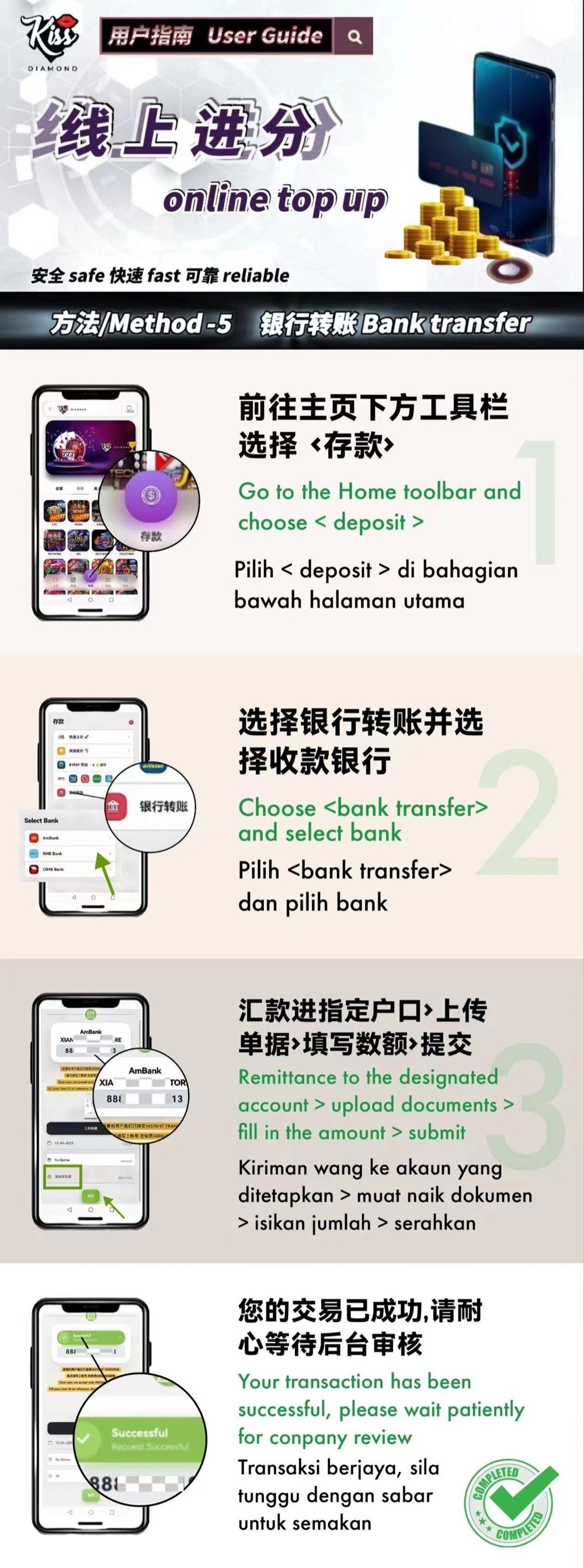
Select Deposit from the member-platform toolbar.
Bank Transfer Illustrated Tutorial
KissDiamond — This guide explains the supplied manual bank-transfer flow. Recipient details can change, so copy them only from the current member Deposit screen and never from an old screenshot or message.
Confirm the account name, amount and destination inside the official member platform. Never transfer funds using instructions received from an unverified contact.
Step Summary
Select Deposit from the member-platform toolbar.
Open Bank Transfer and select a receiving bank currently displayed for your account.
Send the exact amount to the displayed recipient, then upload the requested receipt or reference and submit the form.
Keep the transfer record and allow the member platform to display the request result before making another transfer.
Bank Transfer
Common Errors
Recipient details may change. Always copy the current account shown inside the member platform.
Make sure the amount, bank reference and uploaded proof correspond to the same transfer.
A submitted request may need review. Ask Customer Support before repeating a transfer with an unclear status.
KissDiamond
Open the member platform, select the method currently available to your account and compare each screen with the guide. Stop and contact support if the recipient, amount or status does not match.